



LV
0
- Joined
- Dec 27, 2025
- Messages
- 8
- Solutions
- 1
- Reaction score
- 4
- Points
- 5
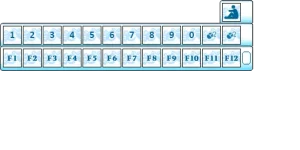
Nowadays, many keyboards no longer include the Insert key. Because of this, you can conveniently add a Sit button directly to your fast action bar.
This guide explains how to implement it.
 Step 1 — Edit UIEquipForm.cpp
Open UIEquipForm.cpp and locate the following line:
Right after the initialization of btnFastUp and btnFastDown, insert this code:
In the same file, find the function:
Inside this function, locate the block containing:
Insert the following code right above it:
 Step 2 — Edit main.clu
You can either replace your fast bar panel with the version below or simply add the btnSit button wherever it fits your layout.
This guide explains how to implement it.
Step 1 — Edit UIEquipForm.cppOpen UIEquipForm.cpp and locate the following line:
C++:
CForm* frmFast = _FindForm("frmFast");Right after the initialization of btnFastUp and btnFastDown, insert this code:
C++:
CTextButton* btnSit = dynamic_cast<CTextButton*>(frmFast->Find("btnSit"));
if (!btnSit) return Error(g_oLangRec.GetString(45), frmFast->GetName(), "btnSit");
btnSit->evtMouseClick = _evtButtonClickEvent;
In the same file, find the function:
C++:
void CEquipMgr::_evtButtonClickEventInside this function, locate the block containing:
C++:
else if("btnClose")Insert the following code right above it:
C++:
else if (name == "btnSit")
{
    CGameScene* scene = g_pGameApp ? g_pGameApp->GetCurScene() : nullptr;
    CWorldScene* world = dynamic_cast<CWorldScene*>(scene);
    if (!world) return;

    if (!world->GetMainCha() || world->GetMainCha()->IsBoat())
        return;

    CInsertState* seat = dynamic_cast<CInsertState*>(world->GetMainCha()->GetActor()->GetCurState());
    if (seat)
    {
        seat->Cancel();
        return;
    }

    seat = new CInsertState(world->GetMainCha()->GetActor());
    seat->SetIsSend(true);
    seat->SetAngle(world->GetMainCha()->getYaw());
    world->GetMainCha()->GetActor()->SwitchState(seat);
    return;
}You can either replace your fast bar panel with the version below or simply add the btnSit button wherever it fits your layout.
Code:
frmFast = UI_CreateForm( "frmFast", FALSE, 432, 121, 290, 557, TRUE, FALSE )
--UI_FormSetHotKey( frmFast, ALT_KEY, HOTKEY_T )
UI_ShowForm( frmFast, TRUE )
UI_SetFormStyle( frmFast, 7 )
UI_AddFormToTemplete( frmFast, FORM_MAIN )
UI_SetIsDrag( frmFast, TRUE )
UI_FormSetIsEscClose( frmFast, FALSE )
imgMain1 = UI_CreateCompent( frmFast, IMAGE_TYPE, "imgMain1", 432, 121, 0, 0 )
UI_LoadImage( imgMain1, "texture/ui/frmfast18.png", NORMAL, 432, 121, 0, 0 )
UI_SetAlpha( imgMain1, 200 )
fscMainF0 = UI_CreateCompent( frmFast, FAST_COMMANG_TYPE, "fscMainF0", 32, 32, 5, 83 )
fscMainF1 = UI_CreateCompent( frmFast, FAST_COMMANG_TYPE, "fscMainF1", 32, 32, 39, 83 )
fscMainF2 = UI_CreateCompent( frmFast, FAST_COMMANG_TYPE, "fscMainF2", 32, 32, 73, 83 )
fscMainF3 = UI_CreateCompent( frmFast, FAST_COMMANG_TYPE, "fscMainF3", 32, 32, 107, 83 )
fscMainF4 = UI_CreateCompent( frmFast, FAST_COMMANG_TYPE, "fscMainF4", 32, 32, 141, 83 )
fscMainF5 = UI_CreateCompent( frmFast, FAST_COMMANG_TYPE, "fscMainF5", 32, 32, 175, 83 )
fscMainF6 = UI_CreateCompent( frmFast, FAST_COMMANG_TYPE, "fscMainF6", 32, 32, 209, 83 )
fscMainF7 = UI_CreateCompent( frmFast, FAST_COMMANG_TYPE, "fscMainF7", 32, 32, 243, 83 )
fscMainF8 = UI_CreateCompent( frmFast, FAST_COMMANG_TYPE, "fscMainF8", 32, 32, 277, 83 )
fscMainF9 = UI_CreateCompent( frmFast, FAST_COMMANG_TYPE, "fscMainF9", 32, 32, 311, 83 )
fscMainF10 = UI_CreateCompent( frmFast, FAST_COMMANG_TYPE, "fscMainF10", 32, 32, 345, 83 )
fscMainF11 = UI_CreateCompent( frmFast, FAST_COMMANG_TYPE, "fscMainF11", 32, 32, 379, 83 )

--Create HotBar 2
fscMainF212= UI_CreateCompent( frmFast, FAST_COMMANG_TYPE, "fscMainF212", 32, 32, 5, 44 )
fscMainF213= UI_CreateCompent( frmFast, FAST_COMMANG_TYPE, "fscMainF213", 32, 32, 39, 44 )
fscMainF214= UI_CreateCompent( frmFast, FAST_COMMANG_TYPE, "fscMainF214", 32, 32, 73, 44 )
fscMainF215= UI_CreateCompent( frmFast, FAST_COMMANG_TYPE, "fscMainF215", 32, 32, 107, 44 )
fscMainF216= UI_CreateCompent( frmFast, FAST_COMMANG_TYPE, "fscMainF216", 32, 32, 141, 44 )
fscMainF217= UI_CreateCompent( frmFast, FAST_COMMANG_TYPE, "fscMainF217", 32, 32, 175, 44 )
fscMainF218= UI_CreateCompent( frmFast, FAST_COMMANG_TYPE, "fscMainF218", 32, 32, 209, 44 )
fscMainF219= UI_CreateCompent( frmFast, FAST_COMMANG_TYPE, "fscMainF219", 32, 32, 243, 44 )
fscMainF220= UI_CreateCompent( frmFast, FAST_COMMANG_TYPE, "fscMainF220", 32, 32, 277, 44 )
fscMainF221= UI_CreateCompent( frmFast, FAST_COMMANG_TYPE, "fscMainF221", 32, 32, 311, 44 )
fscMainF222 = UI_CreateCompent( frmFast, FAST_COMMANG_TYPE,"fscMainF222", 32, 32, 345, 44 )
fscMainF223 = UI_CreateCompent( frmFast, FAST_COMMANG_TYPE,"fscMainF223", 32, 32, 379, 44 )
-------------------------------------------------------------------------------------------
btnSit = UI_CreateCompent( frmFast, BUTTON_TYPE, "btnSit", 32, 32, 379, 5 )

btnFastUp = UI_CreateCompent( frmFast, BUTTON_TYPE, "btnFastUp", 7, 8, 417, 12 + 78 )
UI_LoadButtonImage( btnFastUp, "texture/ui/Nbotton.tga", 7, 8, 82, 2, TRUE )
UI_SetHint( btnFastUp, "Next (Ctrl+[, Ctrl+], Tab)" )
btnFastDown = UI_CreateCompent( frmFast, BUTTON_TYPE, "btnFastDown", 7, 8, 417, 22 + 78 )
UI_LoadButtonImage( btnFastDown, "texture/ui/Nbotton.tga", 7, 8, 82, 12, TRUE )
UI_SetHint( btnFastDown, "Next (Ctrl+[, Ctrl+], Tab)" )
Attachments
Last edited:
