

Tales of Pirates [Unity]

milten21

Pirate
Registered
LV
0
 
Joined
Apr 25, 2026
Messages
8
Reaction score
17
Points
5
Hey folks,
I’ve been experimenting with Unity and ToP sources lately and have achieved some cool results.

I was able to load the terrain map and the full list of objects into Unity at runtime, as well as add first-class support for the game’s proprietary file formats (e.g., .map, .lmo, .lgo, .lab, etc.) using Unity’s editor extensibility. Here’s a video of me doing random things within Unity:

Please ignore some objects with missing textures or incorrect placement/scaling - the game’s graphics files have multiple versions, and I haven’t yet added support for all of them or resolved all related issues. I’m sharing this early to gather feedback and avoid spending time on something that may not be of interest.

I’m not entirely sure where this will lead yet, but my current plan for phase 1 is to build a full port of the game that is compatible with all ToP files. This would allow custom server content to continue working and could potentially be adopted by the community. The biggest challenge I see at the moment is porting the game’s UI, as it appears to require significant effort.

Additionally, this approach enables access to the full set of Unity tools and features. For example, even at this stage, editing maps is already quite straightforward - you can modify terrain data, add layers, etc. Saving map objects (e.g., .obj files) will be somewhat more complex but still entirely feasible. Converting models .obj -> .lmo/.lgo and back is possible too. Unity features a lot of editor level and tooling extensibility. And finally - easy cross-platform support.

At this stage, I’d really appreciate your thoughts and feedback.
 
Last edited:
UPD #1: Fixed most of the texture and object sizing issues and added support for animations and particle systems. However, the latter appeared to be quite problematic, and most of those are currently broken.
 
This is what I been thinking lately with all the big AI tech companies releasing smarter agents and AI breakthroughs all at the same time--great time to re-experiment everything that's been failing in the past...

Like:
Please, Log in or Register to view URLs content!

I see they're giving a free trial:
Please, Log in or Register to view URLs content!
 
This is what I been thinking lately with all the big AI tech companies releasing smarter agents and AI breakthroughs all at the same time--great time to re-experiment everything that's been failing in the past...

Like:
Please, Log in or Register to view URLs content!

I see they're giving a free trial:
Please, Log in or Register to view URLs content!
You’ve probably mixed it up with MCP. The thing you referenced is aimed at training in-game AI (e.g., the systems that control enemies), whereas MCP enables your coding AI to use features exposed by MCP (for example, interacting with the Unity Editor and the game world).
There are multiple MCP implementations for Unity, including the official one (
Please, Log in or Register to view URLs content!
) and several third-party options, such as:
You don’t need to buy anything to use it, aside from your AI subscription or token usage.
I haven’t tried any of them yet, so I can’t provide feedback on how they work.

But in general, you’re right - AI simplifies a lot of coding work and experimenting has never been easier. I used it to build most of the math for coordinate transformations to make it compatible with Unity based on the game’s source code for the demos above.
 
Thank you for all the clarity!!!

You right I was so hyped up to post a first message...
So I quickly went to check back on what I intuitively thought was it haha, but you came in to the rescue with more of what picked my curiosity allot the last few weeks.

Yes for me I actually learn alot more since of it because I want to understand their reasoning and they can make mistakes, but when we report them, the AI will understand their or our confusion---explain the next likely logic and go on which for me is a fun interactive experience.

When it does mess up, it often turns out to be not that big of a deal...

And then 4 hours passed, and your like, Wait?! I'm finally able to run in a God-mode--bad-ass "building Fairy"... 😎
 
Last edited:
It’s been a while since my last update, but I’m still actively working on the project. Unfortunately, progress has been slow due to limited free time, but I’m continuing to work on it consistently. The main focus has been polishing the existing functionality and finishing support for the remaining game data types.

The only major piece left before moving on to gameplay systems or finishing editor tooling is porting the particle and effects systems, which has turned out to be particularly challenging.

As for the editor tooling, I’m considering shipping it as a plugin through the Unity Asset Store. The workflow would look something like this:
  • Install Unity
  • Add the tooling plugin
  • Select your client folder
  • Wait for the Unity asset importer to process the assets (it is no joke, can take up to an hour)
  • Enjoy tooling
In general, I’m thinking about adding the following capabilities:
  • Viewing all 3D-related assets (.lgo, .lmo, .lab, .par, .eff)
  • Exporting assets to more modern and widely used formats (e.g., .obj, .fbx)
  • Importing assets back into the game’s formats directly from Unity (e.g., right-click any Unity asset -> Export to .lmo)
  • Editing and compiling the game’s data tables
  • Using Unity as a map editor for .map and .obj files
At this stage, I’m mainly interested in hearing your thoughts and feedback.

Progress highlights:

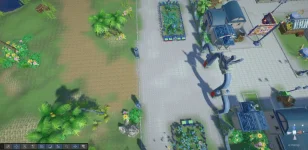
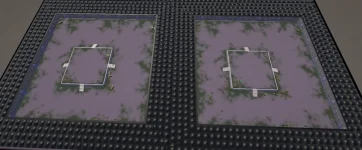
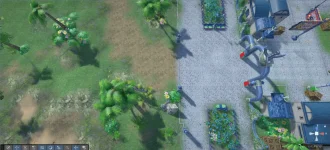
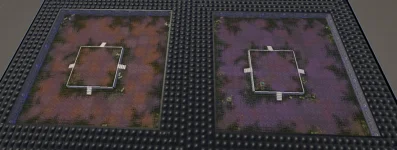
- Terrain
Before
1779903492799.webp1779903635168.webp

After

1779903503048.webp1779903654532.webp

- Bone animations

- Texture UV animations

- Mobs and characters
 
Animation activation is practically 1:1, like the old client, full effects support (it works, I haven't found any bugs), lgo and lab import, and a bone visualizer. Might come in handy.
 

Attachments

Animation activation is practically 1:1, like the old client, full effects support (it works, I haven't found any bugs), lgo and lab import, and a bone visualizer. Might come in handy.
That's cool, thanks for sharing! I'll take a closer look over the weekend.

I ended up with a similar approach for effects rendering. My biggest struggle was getting it to work with Unity's ParticleSystem, which I gave up for now - it doesn't map particularly well and need a lot of workarounds and testing. Your approach looks a bit more compact and cleaner than mine, especially using shaders for color keying.

Are you still working with Unity? I'd like to collab if you're still in and interested. Feel free to reach me out on Discord (@milten21). More hands more progress :D

I plan to open source the project eventually, once I have a more solid foundation and at least some gameplay systems implemented.
 
My goal was to completely switch to FBX, which I export from LGO, LMO, and Lab. But 100% accuracy won't be achieved, especially since if you treat the FBX sources as source files, importing them back into Blender will reorient the bones again. I believe the approach of using a map, an object by its nominal value, etc. is incorrect. I need to gather all the resources from all released official clients and translate them into a custom roundtrip. Effects, how to manually transfer them. Then it will be really cool, because these files contain a lot of unnecessary junk. I'm not working on a game yet.
 
100% rendering accuracy is not achievable and I don’t think it’s worth pursuing. Getting close to the original style is good enough.

The bone reorientation problem is fairly easy to solve if Unity is used as the central place for working with assets and if we have consistent import/export tooling. Everything except effects is relatively easy to export, and for effects, we could build an in-Unity editor using EditorWindow (the model viewer from my post above is an example of this). I’ve experimented with it and can say it’s completely doable.

That said, I get your point and tend to agree. I’m considering abandoning my initial approach of trying to make everything work with the original game files as-is. The further I go the more it feels like I’m fighting the engine itself.

For example, I’m currently deciding how to handle the game’s data tables. It would be very nice to represent them as ScriptableObjects, but then the source-of-truth problem appears. If the original .txt / .bin files are treated as the source of truth and the ScriptableObjects are generated via ScriptedImporter, we cannot simply edit those ScriptableObjects directly in Unity. Instead, we have to update the .txt files, which limits the usefulness of Unity. The same problem keeps reappearing in many other places.

Instead, I’m thinking about a multi-tier solution:
- Create a plain .NET NuGet package for working with the game formats. Why not? Someone might find it useful elsewhere. Potentially can include any engine agnostic features as well.
- Create a Unity tooling package, distributed via UPM, that uses the .NET package for loading data and adds Unity Editor tools on top (ScriptedImporters, import/export features, a model viewer, a .par / .eff editor, etc.).
- For the game itself, perform a full asset conversion into more common formats (.fbx, .glTF, .obj, or similar), as you mentioned. The idea is to add a custom Unity tool for importing the entire game client resource set into Unity - not just a ScriptedImporter, but a full conversion pipeline. Basically, you select the game client folder, and the tool does the rest. Although exporting back might be possible, I’m not sure it’s worth doing. This feels more like one-way modernization.

The only reason I’m still hesitant about this approach is that one of my goals is to make the client playable with the original server itself, at least to some extent. If the original files are converted, it may be difficult to find common ground, especially when something needs to be changed.
 
Updates:

- fixed most of .eff and .par loading issues;
- refactored a lot of code;
- reworked rendering to match the original style;
- added character movement added to the game;
- added lua bridging;
- added NPCs loading;
- added NPC dialogs;

I have setup a separate repository where I started migrating the file format–related code and Unity tooling, independent of the game itself. I plan to open-source it soon.

At the moment, I wouldn’t expect the tooling to be particularly useful beyond viewing models and effects, as I’ve recently shifted my focus toward architecture, gameplay features, and refactoring.

The NPC system shown in the video below utilizes the original server-side Lua scripts for dialogs without any modifications. This demonstrates that the Unity port can be fully compatible with existing Lua scripts. The dialog UI is just a playground artifact, I haven't start work on UI system it yet.


UPD: Just forgot that I haven't showcased any .eff/.par rendering in the above video, here are few examples:


Last edited:
  • Like
Reactions: Zakernado and zLuke
Since the billboards are facing the camera, you'll need a camera for debugging effects, just like the game camera. Or we need to create custom behavior for billboards for non-standard angles so that there is no distortion of the effects
Object textures should be imported without compression and anti-aliasing. There's a little trick that can improve texture quality. You should convert all textures to, say, PNG format and analyze them within LGO.ColorKey. Convert the color key to alpha. Then you can use Unity compression and anti-aliasing, which will remove the pixel grid from the textures. (they talk about anti-aliasing here, but I meant the smoothing of the textures themselves, which occurs when importing the texture)
 
You also have an inaccuracy in the ground shader. You're decorating the vertex color incorrectly. It's an old Color565 that needs to be converted correctly. Then the colors will be correct.
In our .map reader, the tile color is stored as a 16-bit Color565 value. We read it from the tile data as two bytes using BitConverter.ToUInt16(raw, 5). After that, we split this 16-bit value into separate color channels. In our current map format, the bit layout is BBBBB GGGGGG RRRRR, which means that red is stored in the lower 5 bits, green is stored in the middle 6 bits, and blue is stored in the upper 5 bits. So we extract the channels like this: blue is (color565 >> 11) & 0x1F, green is (color565 >> 5) & 0x3F, and red is color565 & 0x1F. Then each channel is expanded from its 5-bit or 6-bit range to the normal 8-bit 0–255 range used by Unity’s Color32. For 5-bit channels we use (value << 3) | (value >> 2), and for the 6-bit green channel we use (value << 2) | (value >> 4). The final result is created as new Color32(r, g, b, 255). This converted color is then assigned to the tile mesh as its vertex color in Unity.
 
Last edited:
The same goes for a regular environment shader. According to my calculations, this shader would be the closest. It emulates unlit lighting but still supports shadows and color sources. The end result will be a very close-to-original image, but with shadows and the ability to use lighting instead of EFF fake highlights.
The original models have inappropriate normal directions, so they will always look bad and need to be recalculated or not used at all. This will result in a scene that always looks dull and dark, not vibrant like the original. You should also disable tone correction, which is enabled by default in Unity (it causes color distortion).
 

Attachments

We are trying to operate with Godot and we use opencode as AI. It seems to work and we also try our old files with features adding it into it. Maybein 1 month we will open a closed beta to test ^^